mirror of
https://github.com/infiniflow/ragflow.git
synced 2026-05-29 20:17:35 +08:00
 78188ce9e9
### What problem does this PR solve?

Closes #14058.

RAGFlow supports multiple PDF parsing backends (DeepDOC, MinerU,
Docling, TCADP, PaddleOCR). This PR adds **OpenDataLoader**
([opendataloader-project/opendataloader-pdf](https://github.com/opendataloader-project/opendataloader-pdf))
as a new optional backend, giving users a deterministic, local-first
alternative with competitive table extraction accuracy.

### Type of change

- [x] New Feature (non-breaking change which adds functionality)
- [x] Documentation Update

---

### Changes

#### Backend
- `deepdoc/parser/opendataloader_parser.py` — new `OpenDataLoaderParser`
class inheriting `RAGFlowPdfParser`. Implements `check_installation()`
(guards Python package + Java 11+ runtime), `parse_pdf()` with
JSON-first extraction (heading/paragraph/table/list/image/formula) and
Markdown fallback, position-tag generation compatible with the shared
`@@page\tx0\tx1\ty0\ty1##` format, and temp-dir lifecycle with cleanup.
- `rag/app/naive.py` — new `by_opendataloader()` wrapper, registered in
`PARSERS` dict, added to `chunk_token_num=0` override list.
- `rag/flow/parser/parser.py` — `"opendataloader"` branch in the
pipeline PDF handler + check validation list.

#### Infrastructure
- `docker/entrypoint.sh` — `ensure_opendataloader()` function: opt-in
via `USE_OPENDATALOADER=true`, skips gracefully if Java is not on PATH.

#### Frontend
- `web/src/components/layout-recognize-form-field.tsx` —
`OpenDataLoader` added to `ParseDocumentType` enum and parser dropdown.
Cascades automatically to the pipeline editor's Parser component.

#### Docs
- `docs/guides/dataset/select_pdf_parser.md` — added OpenDataLoader
entry and full env-var reference.

---

### Environment variables

| Variable | Default | Description |
|---|---|---|
| `USE_OPENDATALOADER` | `false` | Set `true` to install
`opendataloader-pdf` on container startup |
| `OPENDATALOADER_VERSION` | latest | Pin the PyPI release (e.g.
`==2.2.1`) |
| `OPENDATALOADER_HYBRID` | _(unset)_ | Enable hybrid AI mode (e.g.
`docling-fast`) |
| `OPENDATALOADER_IMAGE_OUTPUT` | _(unset)_ | `off` / `embedded` /
`external` |
| `OPENDATALOADER_OUTPUT_DIR` | _(tmp)_ | Persistent output dir; temp
dir used + cleaned if unset |
| `OPENDATALOADER_DELETE_OUTPUT` | `1` | `0` to retain intermediate
files for debugging |
| `OPENDATALOADER_SANITIZE` | _(unset)_ | `1` to filter prompt-injection
patterns from output |

---

### Dependencies

- **Runtime**: `opendataloader-pdf` (PyPI, Apache 2.0) — opt-in, not
added to `pyproject.toml` core deps. Installed by
`ensure_opendataloader()` at container startup when
`USE_OPENDATALOADER=true`.
- **System**: Java 11+ on PATH (JVM is the underlying engine). The
installer skips with a warning if `java` is not found.

---

### How to test

**Standalone parser:**
```bash
source .venv/bin/activate
uv pip install opendataloader-pdf
python3 -c "
import sys; sys.path.insert(0, '.')
from deepdoc.parser.opendataloader_parser import OpenDataLoaderParser
p = OpenDataLoaderParser()
print('available:', p.check_installation())
s, t = p.parse_pdf('path/to/test.pdf', parse_method='pipeline')
print(f'sections={len(s)} tables={len(t)}')
"

```
### Benchmark vs Docling
```
file                      parser            secs  sections  tables
----------------------------------------------------------------------
text-heavy.pdf            docling           45.29       148      10
text-heavy.pdf            opendataloader     3.14       559       0
table-heavy.pdf           docling           7.05        76       3
table-heavy.pdf           opendataloader     3.71        90       0
complex.pdf               docling            42.67       114       8
complex.pdf               opendataloader     3.51       180       0
```
92 lines
5.4 KiB
Markdown
92 lines
5.4 KiB
Markdown
---
|
|
sidebar_position: -3
|
|
slug: /select_pdf_parser
|
|
sidebar_custom_props: {
|
|
categoryIcon: LucideFileText
|
|
}
|
|
---
|
|
# Select PDF parser
|
|
|
|
Select a visual model for parsing your PDFs.
|
|
|
|
---
|
|
|
|
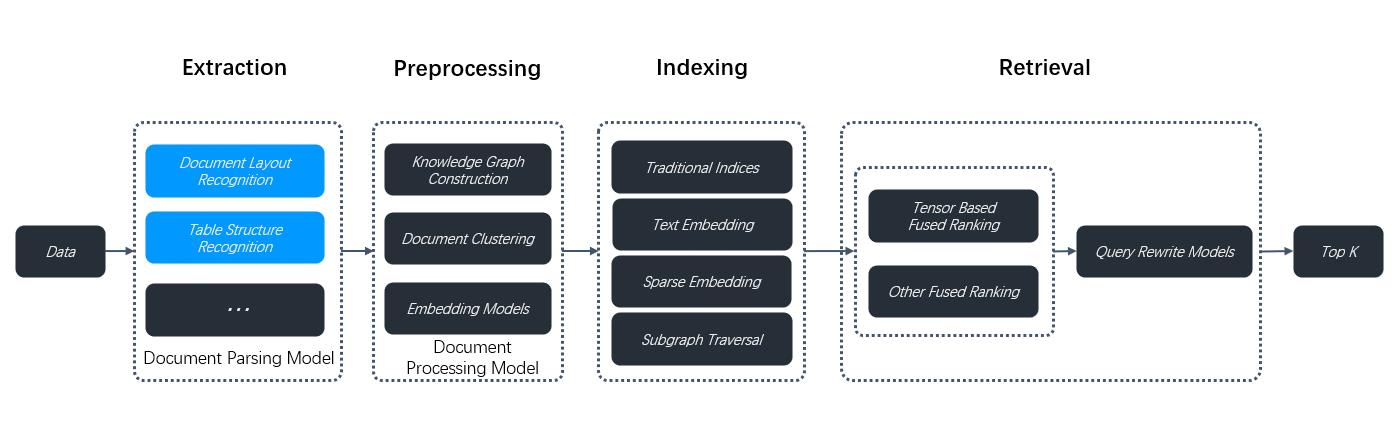
RAGFlow isn't one-size-fits-all. It is built for flexibility and supports deeper customization to accommodate more complex use cases. From v0.17.0 onwards, RAGFlow decouples DeepDoc-specific data extraction tasks from chunking methods **for PDF files**. This separation enables you to autonomously select a visual model for OCR (Optical Character Recognition), TSR (Table Structure Recognition), and DLR (Document Layout Recognition) tasks that balances speed and performance to suit your specific use cases. If your PDFs contain only plain text, you can opt to skip these tasks by selecting the **Naive** option, to reduce the overall parsing time.
|
|
|
|
|
|
|
|
## Prerequisites
|
|
|
|
- The PDF parser dropdown menu appears only when you select a chunking method compatible with PDFs, including:
|
|
- **General**
|
|
- **Manual**
|
|
- **Paper**
|
|
- **Book**
|
|
- **Laws**
|
|
- **Presentation**
|
|
- **One**
|
|
- To use a third-party visual model for parsing PDFs, ensure you have set a default VLM under **Set default models** on the **Model providers** page.
|
|
|
|
## Quickstart
|
|
|
|
1. On your dataset's **Configuration** page, select a chunking method, say **General**.
|
|
|
|
_The **PDF parser** dropdown menu appears._
|
|
|
|
2. Select the option that works best with your scenario:
|
|
|
|
- DeepDoc: (Default) The default visual model performing OCR, TSR, and DLR tasks on PDFs, but can be time-consuming.
|
|
- Naive: Skip OCR, TSR, and DLR tasks if _all_ your PDFs are plain text.
|
|
- [MinerU](https://github.com/opendatalab/MinerU): (Experimental) An open-source tool that converts PDF into machine-readable formats.
|
|
- [Docling](https://github.com/docling-project/docling): (Experimental) An open-source document processing tool for gen AI.
|
|
- [OpenDataLoader](https://github.com/opendataloader-project/opendataloader-pdf): (Experimental) A deterministic, local-first PDF parser with structured JSON + Markdown output. Runs as a standalone service container so no Java runtime is needed on the RAGFlow host.
|
|
- A third-party visual model from a specific model provider.
|
|
|
|
:::danger IMPORTANT
|
|
Starting from v0.22.0, RAGFlow includes MinerU (≥ 2.6.3) as an optional PDF parser of multiple backends. Please note that RAGFlow acts only as a *remote client* for MinerU, calling the MinerU API to parse documents and reading the returned files. To use this feature:
|
|
:::
|
|
|
|
1. Prepare a reachable MinerU API service (FastAPI server).
|
|
2. In the **.env** file or from the **Model providers** page in the UI, configure RAGFlow as a remote client to MinerU:
|
|
- `MINERU_APISERVER`: The MinerU API endpoint (e.g., `http://mineru-host:8886`).
|
|
- `MINERU_BACKEND`: The MinerU backend:
|
|
- `"pipeline"` (default)
|
|
- `"vlm-http-client"`
|
|
- `"vlm-transformers"`
|
|
- `"vlm-vllm-engine"`
|
|
- `"vlm-mlx-engine"`
|
|
- `"vlm-vllm-async-engine"`
|
|
- `"vlm-lmdeploy-engine"`.
|
|
- `MINERU_SERVER_URL`: (optional) The downstream vLLM HTTP server (e.g., `http://vllm-host:30000`). Applicable when `MINERU_BACKEND` is set to `"vlm-http-client"`.
|
|
- `MINERU_OUTPUT_DIR`: (optional) The local directory for holding the outputs of the MinerU API service (zip/JSON) before ingestion.
|
|
- `MINERU_DELETE_OUTPUT`: Whether to delete temporary output when a temporary directory is used:
|
|
- `1`: Delete.
|
|
- `0`: Retain.
|
|
3. In the web UI, navigate to your dataset's **Configuration** page and find the **Ingestion pipeline** section:
|
|
- If you decide to use a chunking method from the **Built-in** dropdown, ensure it supports PDF parsing, then select **MinerU** from the **PDF parser** dropdown.
|
|
- If you use a custom ingestion pipeline instead, select **MinerU** in the **PDF parser** section of the **Parser** component.
|
|
|
|
To use an external Docling Serve instance (instead of local in-process Docling), set:
|
|
|
|
- `DOCLING_SERVER_URL`: The Docling Serve API endpoint (for example, `http://docling-host:5001`).
|
|
|
|
When `DOCLING_SERVER_URL` is set, RAGFlow sends PDF content to Docling Serve (`/v1/convert/source`, with fallback to `/v1alpha/convert/source`) and ingests the returned markdown/text. If the variable is not set, RAGFlow keeps using local Docling (`USE_DOCLING=true` + installed package) behavior.
|
|
|
|
:::note
|
|
All MinerU environment variables are optional. When set, these values are used to auto-provision a MinerU OCR model for the tenant on first use. To avoid auto-provisioning, skip the environment variable settings and only configure MinerU from the **Model providers** page in the UI.
|
|
:::
|
|
|
|
:::caution WARNING
|
|
Third-party visual models are marked **Experimental**, because we have not fully tested these models for the aforementioned data extraction tasks.
|
|
:::
|
|
|
|
## Frequently asked questions
|
|
|
|
### When should I select DeepDoc or a third-party visual model as the PDF parser?
|
|
|
|
Use a visual model to extract data if your PDFs contain formatted or image-based text rather than plain text. DeepDoc is the default visual model but can be time-consuming. You can also choose a lightweight or high-performance VLM depending on your needs and hardware capabilities.
|
|
|
|
### Can I select a visual model to parse my DOCX files?
|
|
|
|
No, you cannot. This dropdown menu is for PDFs only. To use this feature, convert your DOCX files to PDF first.
|